Cancel Your Subscription
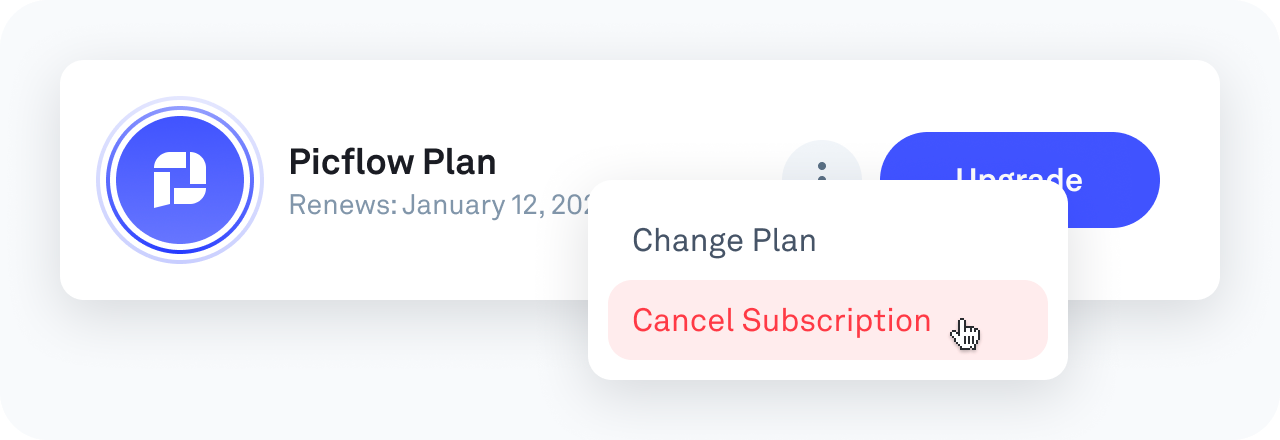
Open Settings → Billing, click the three-dot menu next to your plan and choose Cancel Subscription. You keep your plan until the billing period ends, then move to Picflow Free.
Only workspace owners and admins can change billing. See Roles & Permissions. Cancelling a free trial works a little differently, see Cancel your free trial.
Before You Cancel
When your plan ends, the workspace moves to Picflow Free. Picflow checks that it fits on Free before the cancel dialog opens:
Storage: Free includes 2 GB. If you use more, you see Update Storage and need to delete galleries first. Items in Trash don't count, because Trash empties on its own.
Members: Free includes one seat. If your team, including pending invitations, is larger, Picflow asks you to remove members first.
Cancel a Paid Subscription
Go to Settings → Billing.
Click the three-dot menu next to your plan and select Cancel Subscription.
Choose your main reason and click Next.
Optionally add feedback on Final Question and click Next.
On Confirm Cancellation, click Cancel Subscription.
The confirmation shows the date your billing period ends. On that date you are downgraded to Picflow Free and lose access to premium features. Until then your billing page shows Cancellation Scheduled! and an Expires date.
Once a cancellation is scheduled, you can't change your plan or add storage add-ons until you re-activate it.
Change Your Mind
While a cancellation is scheduled, click Re-Activate next to your plan in Settings → Billing. If you have no valid card on file, Picflow asks you to add one first.
Refunds
Cancelling on its own doesn't refund the current period. Picflow offers a 14-day money-back guarantee on new subscriptions. After 14 days, refunds and credits are not issued, including for mid-cycle cancellations. If a yearly subscription is refunded, one month's fee and non-refundable payment processor fees are deducted. Details are in section 9.2 of the Terms of Service. To request a refund, contact support via the in-app chat or help@picflow.com.
Frequently Asked Questions
I can't find the cancel option. What now?
I can't find the cancel option. What now?
Enterprise plans don't show plan controls on the billing page. Contact support via the in-app chat or help@picflow.com and we cancel it for you. The same applies if the option is missing for any other reason.
Why can't I cancel?
Why can't I cancel?
Only workspace owners and admins can change billing. If you are a member, ask an owner or admin. If you see Update Storage, delete galleries until you are under 2 GB. If Picflow asks you to remove members, do so first, see Remove members.
Was this helpful?
Still need help? Share an idea